Logo
Sign in
  1. SACKit (Engelsk)
  2. Headphones
  3. Touch 300

Playing Music with SACKit Touch 300

browse

When SACKit Touch 300 connects with the mobile phone or Bluetooth transmitter, you can enjoy music
through the headphone wirelessly
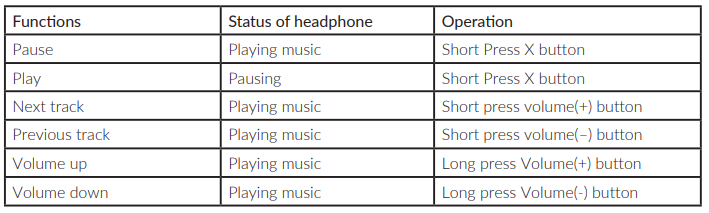
mceclip3.png

  • Was this article helpful? /

  • 1 out of 1 found this helpful

Articles in this section

  • Quick start guide
  • Product overview
  • How to pair SACKit Touch 300 and your device
  • Operation instructions for in-line use
  • How to use the Active Noise Cancellation function
  • Playing Music with SACKit Touch 300
  • Making calls with SACKit Touch 300
  • I experience issues with stability and connection
  • SACKit Touch 300 is not playing music while connected to my device
  • I’m hearing a beep-sound in my headset

Related articles

  • How to pair SACKit Touch 300 and your device
  • Operation instructions for in-line use
  • How to play music
  • Making calls with SACKit Touch 300
  • Product overview

    Articles in this section

  • Quick start guide
  • Product overview
  • How to pair SACKit Touch 300 and your device
  • Operation instructions for in-line use
  • How to use the Active Noise Cancellation function
  • Playing Music with SACKit Touch 300
  • Making calls with SACKit Touch 300
  • I experience issues with stability and connection
  • SACKit Touch 300 is not playing music while connected to my device
  • I’m hearing a beep-sound in my headset

Related articles

  • How to pair SACKit Touch 300 and your device
  • Operation instructions for in-line use
  • How to play music
  • Making calls with SACKit Touch 300
  • Product overview
×
Logo
Logo

© 2022 All Rights Reserved.

English (GB) Dansk Deutsch